
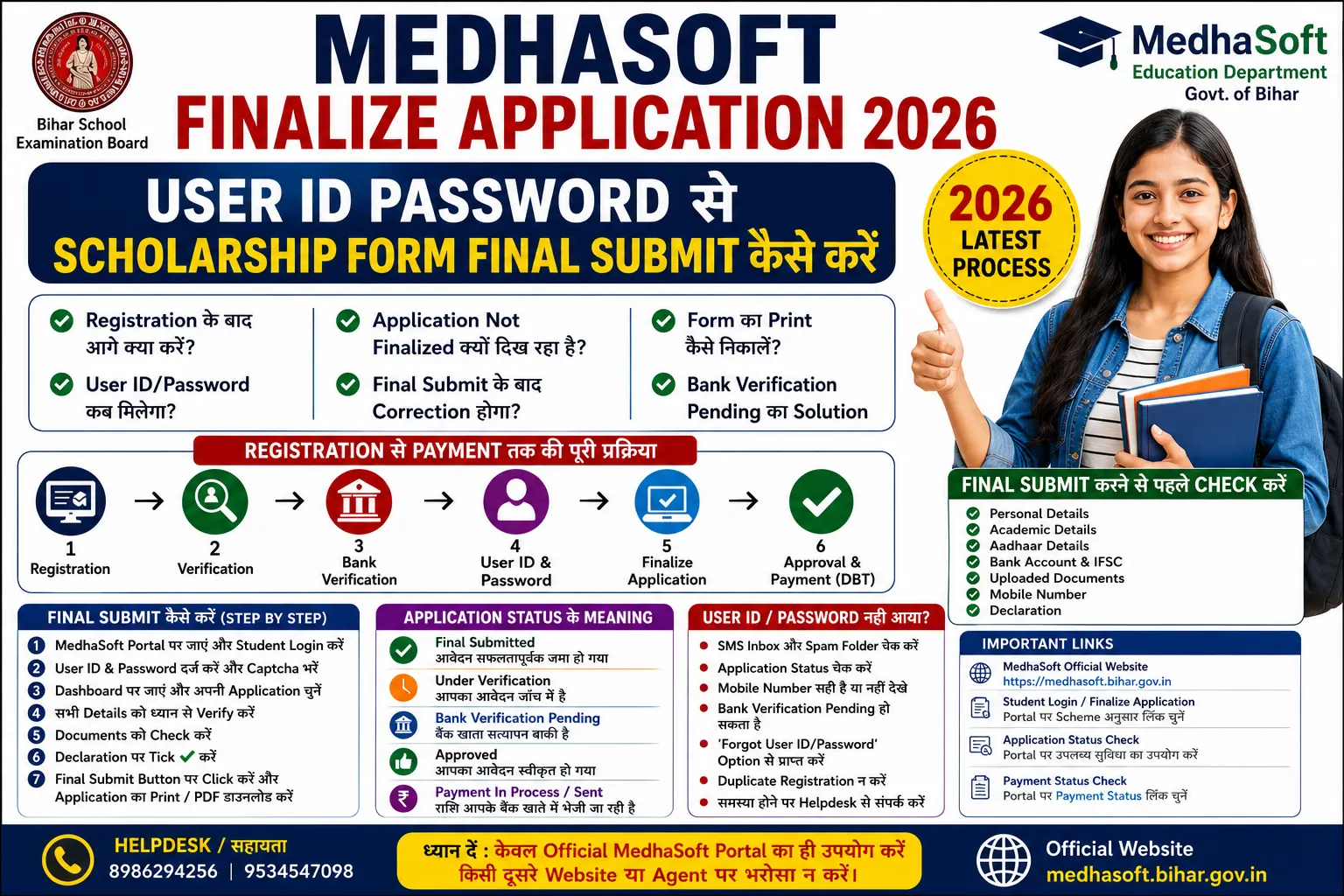
MedhaSoft Finalize Application 2026 Bihar Board Matric, Inter और अन्य eligible scholarship applicants के लिए registration के बाद पूरा किया जाने वाला सबसे महत्वपूर्ण चरण है। बहुत से विद्यार्थी MedhaSoft portal पर initial registration करने के बाद यह मान लेते हैं कि उनका scholarship form पूरी तरह submit हो चुका है। बाद में Application Status check करने पर उन्हें Application Not Finalized, Registered, Bank Verification Pending या User ID Generated जैसे messages दिखाई देते हैं।
असल में MedhaSoft scholarship process कई अलग-अलग stages में पूरा होता है। केवल registration करने से application final नहीं माना जाता। Registration के बाद student details और bank information का verification हो सकता है। इसके बाद User ID और password प्राप्त होने पर applicant को Student Login करके form की सभी details दोबारा जांचनी होती हैं और Finalize Application या Final Submit का चरण पूरा करना होता है।
MedhaSoft के विभिन्न student modules में Registration, Finalize Application और Application Status अलग-अलग options के रूप में दिखाए जाते हैं। Inter scholarship के पुराने modules और graduate scholarship portal पर भी Finalize Application एक separate student service के रूप में उपलब्ध है। इससे स्पष्ट है कि registration और finalisation दो अलग प्रक्रियाएं हैं।
यदि application final submit नहीं की गई है, तो form verification, approval और payment process में आगे नहीं बढ़ सकता। इसलिए student को केवल registration acknowledgement देखकर संतुष्ट नहीं होना चाहिए। उसे अपने status में यह देखना चाहिए कि application Final Submitted या equivalent completed stage में पहुंच गई है।
इस article में आपको निम्न प्रश्नों के स्पष्ट उत्तर मिलेंगे:
- MedhaSoft registration और finalisation में क्या अंतर है?
- User ID और password कब मिलता है?
- Bank Verification Pending क्यों दिखता है?
- Student Login कैसे करें?
- Final submit से पहले क्या-क्या check करना चाहिए?
- MedhaSoft application not finalized error कैसे ठीक करें?
- Final submit के बाद correction हो सकती है या नहीं?
- Scholarship form का print और PDF कैसे निकालें?
- User ID/password भूलने पर क्या करें?
- Final submission के बाद payment तुरंत आएगा या नहीं?
MedhaSoft Finalize Application 2026: AI Overview
MedhaSoft पर scholarship form की सामान्य प्रक्रिया इस प्रकार होती है:
Registration → Data Verification → Bank Verification → User ID/Password → Student Login → Finalize Application → Application Verification → Approval → DBT Payment
Student पहले अपना registration number, roll details, Aadhaar, mobile और bank information दर्ज करता है। इसके बाद system या department द्वारा details verify की जा सकती हैं। Verification complete होने पर User ID और password registered mobile number पर प्राप्त हो सकता है।
इसके बाद student को MedhaSoft portal के Student Login या Finalize Application section में login करना होता है। Login करने के बाद personal details, academic information, Aadhaar, bank account और uploaded documents को दोबारा check करना चाहिए।
सब कुछ सही होने पर declaration स्वीकार करके Final Submit करना जरूरी है। Final submit के बाद application PDF या print सुरक्षित रखें।
यदि status में Application Not Finalized दिख रहा है, तो इसका मतलब है कि registration हो चुका है लेकिन final submission बाकी है।
MedhaSoft Finalize Application 2026: Overview
विवरण | जानकारी |
Portal | MedhaSoft |
मुख्य उद्देश्य | Scholarship application final submit करना |
Applicable Students | Eligible Matric, Inter और अन्य scheme applicants |
Registration के बाद | Verification और login credentials |
Login Details | User ID और Password |
Finalisation | Student login से |
Final Submit जरूरी | हां |
Status Message | Final Submitted/Equivalent Completed Status |
Print/PDF | Final submission के बाद सुरक्षित करें |
Correction | Final submit के बाद सीमित या unavailable हो सकती है |
Payment | Verification और approval के बाद DBT से |
Official Source | MedhaSoft Portal |
MedhaSoft Registration और Finalisation में अंतर
यह सबसे जरूरी concept है।
Registration क्या है?
Registration application process का पहला चरण है। इसमें student अपनी basic details portal पर दर्ज करता है।
Registration में सामान्यतः निम्न जानकारी भरी जाती है:
- Registration number
- Roll code
- Roll number
- Student name
- Father’s name
- Mother’s name
- Date of birth
- Passing year
- Marks और division
- Aadhaar number
- Mobile number
- Bank account number
- IFSC code
- Category
- Address
- आवश्यक documents
Registration submit होने के बाद student का application record बन जाता है।
Finalisation क्या है?
Finalisation वह प्रक्रिया है जिसमें student login करके अपने application को final confirmation देता है।
Finalisation के समय student:
- Registration details verify करता है।
- Bank details check करता है।
- Aadhaar information देखता है।
- Uploaded documents verify करता है।
- गलत या missing information सुधारता है, जहां edit allowed हो।
- Declaration स्वीकार करता है।
- Final Submit button पर click करता है।
- Application print या PDF निकालता है।
Registration और Finalisation Comparison
Registration | Finalisation |
Application शुरू करता है | Application पूरा करता है |
Basic details भरी जाती हैं | Details final verify होती हैं |
Registration record बनता है | Final application submit होती है |
User ID तुरंत या verification के बाद मिल सकता है | User ID/password से login जरूरी |
Form अभी pending हो सकता है | Form आगे verification के लिए जाता है |
Status Registered दिख सकता है | Status Final Submitted दिखना चाहिए |
केवल Registration करने से Scholarship मिलेगी?
नहीं।
Registration scholarship process का शुरुआती चरण है। केवल registration होने से payment नहीं मिलेगा।
Application आगे बढ़ने के लिए सामान्यतः:
- Registration complete होना चाहिए।
- Bank और student details verify होनी चाहिए।
- User ID/password प्राप्त होना चाहिए।
- Student Login करना चाहिए।
- Form final submit होना चाहिए।
- Departmental verification complete होना चाहिए।
- Application approve होना चाहिए।
- DBT payment process होना चाहिए।
इसलिए status में केवल Registered दिखना final application completion नहीं है।
User ID और Password कब मिलेगा?
Registration के बाद User ID/password तुरंत भी मिल सकता है या verification के बाद generate हो सकता है। Process scheme और portal module के अनुसार अलग हो सकती है।
पुराने और current MedhaSoft modules में Student Login, Forgot User ID/Password और Get User ID and Password जैसी facilities उपलब्ध रही हैं।
User ID/Password आने में देरी क्यों होती है?
Possible reasons:
- Bank verification pending
- Aadhaar validation pending
- Student record mismatch
- Mobile number verification pending
- Board data verification
- Server load
- Duplicate application check
- Bank account details में error
- Application record incomplete
SMS किस Mobile पर आएगा?
User ID और password registration में दिए गए mobile number पर भेजा जा सकता है।
इसलिए registration में ऐसा mobile number दें जो:
- Active हो
- Student या family के पास हो
- SMS receive करता हो
- आने वाले कई महीनों तक बंद न हो
User ID और Password नहीं आया तो क्या करें?
Step 1: SMS Inbox Check करें
सरकारी sender ID, MedhaSoft या Bihar Government-related SMS देखें।
Spam, blocked SMS और full inbox भी check करें।
Step 2: Application Status Check करें
Status में देखें:
- Registered
- Bank Verification Pending
- User ID Generated
- Application Not Finalized
- Record Not Found
Step 3: Forgot User ID/Password Option Use करें
MedhaSoft के कई modules में Forgot User ID or Password option उपलब्ध है। कुछ recovery pages date of birth या mobile number से credentials खोजने की facility देते हैं।
Step 4: Duplicate Registration न करें
User ID न मिलने पर तुरंत दूसरा registration न करें। Duplicate application से verification problem हो सकती है।
Step 5: Mobile Number Check करें
Registration acknowledgement में देखें कि mobile number सही है या नहीं।
Step 6: Official Helpdesk से संपर्क करें
Registration number, roll number, DOB और error screenshot तैयार रखें।
Bank Verification Pending का क्या मतलब है?
Bank Verification Pending का अर्थ है कि applicant द्वारा दी गई bank details अभी verify नहीं हुई हैं।
Bank verification में निम्न चीजें check हो सकती हैं:
- Account number valid है या नहीं
- IFSC सही है या नहीं
- Account active है या नहीं
- Account holder name match करता है या नहीं
- Aadhaar seeding/DBT status
- Bank account applicant से संबंधित है या नहीं
MedhaSoft के official application-status pages applicants को यह स्पष्ट सूचना देते हैं कि Aadhaar linking और DBT seeding अलग चीजें हैं। यदि bank account Aadhaar के साथ DBT के लिए seeded नहीं है, तो payment नहीं किया जाएगा।
Bank Verification Pending होने पर क्या करें?
- Account number passbook से verify करें।
- IFSC का current code check करें।
- Bank account active रखें।
- KYC complete कराएं।
- Aadhaar link कराएं।
- NPCI mapper में DBT seeding confirm करें।
- Student name bank और Aadhaar में match कराएं।
- Dormant या frozen account activate कराएं।
Bank में क्या बोलें?
Bank branch में कहें:
मेरे bank account को Aadhaar से link करने के साथ NPCI mapper में DBT payment के लिए Aadhaar seed कर दिया जाए।
MedhaSoft Student Login कैसे करें?
Step 1: Official MedhaSoft Homepage खोलें
MedhaSoft की official website खोलें और अपनी scholarship scheme का सही year चुनें।
गलत year या पुराने portal पर login न करें।
Step 2: सही Scheme चुनें
उदाहरण:
- Matric Scholarship
- Inter Scholarship
- SC/ST Medhavriti
- Graduation Incentive
Step 3: Student Login या Finalize Application खोलें
Portal structure के अनुसार option का नाम हो सकता है:
- Student Login
- Login for Student
- Finalize Application
- Final Submit Application
Step 4: User ID दर्ज करें
SMS या recovery option से मिले User ID का उपयोग करें।
Step 5: Password दर्ज करें
Password case-sensitive हो सकता है। Capital और small letters ध्यान से भरें।
Step 6: Captcha भरें
Captcha image में दिखाई गई characters सही भरें।
Step 7: Login करें
Login के बाद dashboard खुलेगा।
Login नहीं हो रहा तो क्या करें?
Wrong User ID or Password
- Extra space न डालें।
- Password copy-paste के बजाय manually type करें।
- Capital letters check करें।
- Forgot Password use करें।
Invalid Captcha
Captcha refresh करें।
Session Expired
Browser बंद करके portal दोबारा खोलें।
Website Slow
- दूसरा official link use करें।
- सुबह या रात कम traffic में login करें।
- Chrome या Edge use करें।
- Browser cache clear करें।
Account Locked
Repeated wrong login के कारण temporary lock हो सकता है। कुछ समय बाद retry करें या helpdesk से संपर्क करें।
Final Submit से पहले कौन-कौन सी Details Check करें?
Finalisation के समय जल्दबाजी न करें। एक गलत bank digit भी payment रोक सकता है।
Personal Details
- Student name
- Father’s name
- Mother’s name
- Date of birth
- Gender
- Category
- Address
- District
Academic Details
- Registration number
- Roll code
- Roll number
- Passing year
- Total marks
- Obtained marks
- Division
- School/college name
Aadhaar Details
- Aadhaar number
- Aadhaar name
- Date of birth
- Gender
Bank Details
- Account holder name
- Account number
- Confirm account number
- IFSC
- Bank name
- Branch
- Account status
- DBT seeding
Uploaded Documents
- Marksheet readable है
- Aadhaar front और back साफ है
- Bank passbook साफ है
- Caste certificate valid है
- Wrong document upload नहीं हुआ
- File पूरी दिखाई दे रही है
Documents दोबारा Check करना क्यों जरूरी है?
Final submission के बाद correction limited या बंद हो सकती है।
Document-related common mistakes:
- Marksheet का आधा भाग upload
- Aadhaar back side missing
- दूसरे student की marksheet
- Blurred bank passbook
- Expired certificate
- Wrong caste certificate
- Edited document
- File open न होना
यदि portal preview सुविधा देता है, तो हर uploaded document खोलकर देखें।
MedhaSoft Final Submit कैसे करें?
Step 1: Student Dashboard खोलें
User ID/password से login करें।
Step 2: Application Details देखें
हर section को खोलकर verify करें।
Step 3: Missing Fields Complete करें
Required field blank हो तो उसे भरें।
Step 4: Bank Details Verify करें
Account number और IFSC दो बार पढ़ें।
Step 5: Documents Verify करें
Wrong file हो तो final submit से पहले replace करें, यदि edit option उपलब्ध हो।
Step 6: Declaration पढ़ें
Declaration में सामान्यतः यह पुष्टि करनी होती है कि दी गई जानकारी सही है।
Step 7: Final Submit Button पर Click करें
Button का नाम portal के अनुसार हो सकता है:
- Final Submit
- Finalize Application
- Submit Application
- Confirm and Submit
Step 8: Confirmation Message पढ़ें
Final submit के बाद success message आना चाहिए।
Step 9: Application Number Note करें
Application/reference number सुरक्षित रखें।
Step 10: Print या PDF Download करें
Final application की copy download करें।
Application Not Finalized Error क्यों दिखता है?
यह message बताता है कि student का initial registration हो चुका है लेकिन final submission पूरा नहीं हुआ।
इसके मुख्य कारण
- User ID/password से login नहीं किया
- Final Submit button click नहीं किया
- Required field खाली है
- Document upload अधूरा है
- Bank verification pending है
- Aadhaar validation pending है
- Declaration accept नहीं किया
- Submit के बाद confirmation नहीं मिला
- Browser session expire हो गया
- Internet disconnect हो गया
Application Not Finalized Error का Solution
Step 1: User ID/Password से Login करें
Registration form दोबारा भरने की जरूरत नहीं है।
Step 2: Pending Section देखें
Dashboard में incomplete या red-marked fields देखें।
Step 3: Missing Details भरें
Mobile, email, bank या document section complete करें।
Step 4: Verification Status देखें
Bank verification pending हो तो कुछ modules में finalisation temporarily unavailable हो सकती है।
Step 5: Declaration Tick करें
Declaration checkbox select करें।
Step 6: Final Submit करें
Submit के बाद confirmation page का screenshot लें।
Step 7: Application Status दोबारा Check करें
Status Final Submitted या equivalent completed stage दिखना चाहिए।
Final Submit के बाद Correction होगी?
Final submit के बाद सामान्यतः direct editing सीमित या बंद हो जाती है।
इसलिए submit से पहले सभी details check करना बहुत जरूरी है।
Correction कब संभव हो सकती है?
- Department correction window खोले
- Application defective status में लौटाई जाए
- Helpdesk correction सुविधा दे
- Portal पर edit/unlock option उपलब्ध हो
- Bank correction request स्वीकार हो
Final Submit के बाद गलती मिलने पर क्या करें?
- Application PDF देखें।
- गलत field mark करें।
- Supporting document तैयार रखें।
- Official helpdesk से संपर्क करें।
- Grievance facility हो तो complaint submit करें।
- Duplicate नया registration न करें।
- Complaint number सुरक्षित रखें।
Final Submit के बाद कौन-सी गलतियां गंभीर हैं?
- Wrong Aadhaar number
- Wrong bank account
- Wrong IFSC
- Wrong student name
- Incorrect registration number
- Wrong roll number
- Wrong category
- Wrong division
- Wrong scheme selection
- दूसरे student का document
Scholarship Form का Print कैसे निकालें?
Computer से
- Final submission confirmation खोलें।
- Print Application या View Application चुनें।
- Ctrl + P दबाएं।
- Printer select करें।
- Print करें।
PDF Save करने के लिए
- Ctrl + P दबाएं।
- Destination में Save as PDF चुनें।
- Save करें।
- File name रखें:
MedhaSoftScholarship2026_Name.pdf
Mobile से
- Application page खोलें।
- Browser menu खोलें।
- Share या Print चुनें।
- Save as PDF करें।
- File phone और Google Drive में सुरक्षित रखें।
Application Print में क्या Check करें?
- Application number
- Student name
- Registration number
- Scheme name
- Passing year
- Bank details के अंतिम digits
- Mobile number
- Final submission date
- Application status
Print और PDF सुरक्षित क्यों रखें?
Application PDF future में उपयोगी हो सकती है:
- Status enquiry
- Helpdesk complaint
- Bank correction
- Payment delay
- Application rejection
- Verification proof
- Duplicate issue
कम-से-कम:
- एक phone copy
- एक email/Drive copy
- एक printed copy
रखें।
Final Submit के बाद Payment कब आएगा?
Final submission के तुरंत बाद payment नहीं आता।
Application आगे इन stages से गुजर सकती है:
- Final Submitted
- Under Verification
- Bank/Aadhaar Validation
- Approved
- Payment Sanctioned
- Payment in Process
- Payment Sent
MedhaSoft पर application status और payment-status facilities अलग उपलब्ध हैं।
Final Submit के बाद Status कैसे Check करें?
- MedhaSoft portal खोलें।
- सही scheme और year चुनें।
- Application Status खोलें।
- Registration number दर्ज करें।
- DOB भरें।
- Registered mobile पर OTP verify करें, जहां required हो।
- Current status देखें।
Inter 2026 के official application-status page पर Registration Number और Date of Birth से status check किया जाता है तथा details देखने के लिए registered mobile पर OTP भेजा जाता है।
Common Status और उनका Meaning
Status | Meaning |
Registered | Initial registration complete |
Application Not Finalized | Final submission pending |
Bank Verification Pending | Bank data verification बाकी |
User ID Generated | Login details तैयार |
Final Submitted | Application complete |
Under Verification | Department checking |
Approved | Application accepted |
Defective | Correction needed |
Rejected | Application accepted नहीं हुई |
Payment in Process | DBT process चल रही |
Payment Sent | Amount bank को भेजी गई |
Payment Failed | Bank/DBT problem |
Cyber Cafe से Final Submit करते समय सावधानी
- User ID/password स्वयं रखें।
- OTP स्वयं डालें।
- Bank details screen पर check करें।
- Aadhaar number दो बार पढ़ें।
- Final submit से पहले preview देखें।
- Application PDF अपने mobile में लें।
- Shared computer से documents delete कराएं।
- Browser logout कराएं।
- Password browser में save न होने दें।
- Agent की “payment guarantee” पर भरोसा न करें।
MedhaSoft Finalize Application Official Links
सुविधा | Official Link |
MedhaSoft Main Portal | |
Inter Scholarship 2026 | |
Inter SC/ST Status | |
Payment Status | |
Forgot User ID/Password | MedhaSoft scheme login में recovery option चुनें |
Education Department |
Session-based links बदल सकते हैं। Main MedhaSoft homepage से सही year और scheme खोलना सबसे सुरक्षित है।
Frequently Asked Questions
MedhaSoft Finalize Application क्या है?
यह registration के बाद scholarship form को final confirmation देकर submit करने की प्रक्रिया है।
क्या केवल registration करना पर्याप्त है?
नहीं। User ID/password से login करके application final submit करना जरूरी है।
User ID और password कब मिलेगा?
Registration और verification के बाद registered mobile पर credentials मिल सकते हैं।
User ID नहीं आया तो क्या करें?
Application status check करें, SMS inbox देखें और Forgot User ID/Password option का उपयोग करें।
Application Not Finalized का क्या मतलब है?
इसका मतलब registration हो चुका है लेकिन final submit बाकी है।
Bank Verification Pending में final submit कर सकते हैं?
यह portal module पर निर्भर करता है। Bank verification पूरा होने तक finalisation option unavailable हो सकता है।
Final Submit Button नहीं दिख रहा तो क्या करें?
Pending fields, document upload, verification status और declaration check करें।
Final submit के बाद correction होगी?
Direct correction सामान्यतः limited होती है। Official correction window या helpdesk की जरूरत पड़ सकती है।
Application final submit हुआ या नहीं कैसे पता करें?
Application status में Final Submitted या equivalent completed status देखें और application print निकालें।
Final submit के बाद पैसा कब आएगा?
Verification, approval और DBT processing के बाद payment आएगा। सभी students की एक fixed date नहीं होती।
Form का print कैसे निकालें?
Final application page पर Print option चुनें या browser में Ctrl + P से Save as PDF करें।
Mobile से final submit कर सकते हैं?
हां। Updated browser और desktop mode के साथ किया जा सकता है।
Wrong bank account final submit हो गया तो क्या करें?
Official helpdesk या grievance facility से correction request करें। दूसरा registration तुरंत न करें।
Forgot Password कैसे recover करें?
Student login page पर Forgot User ID or Password option चुनें।
क्या cyber cafe से finalize कर सकते हैं?
हां, लेकिन सभी details अपने सामने verify करें और User ID/password सुरक्षित रखें।
Final Submit Checklist
- सही scholarship year चुना
- सही scheme चुनी
- User ID/password से login किया
- Student name सही है
- Father और mother name सही हैं
- Registration number सही है
- Roll code और roll number सही हैं
- Passing year सही है
- Marks और division सही हैं
- Aadhaar number सही है
- Aadhaar name match है
- Bank account student के नाम पर है
- Account number सही है
- IFSC valid है
- Bank DBT-seeded है
- Mobile number active है
- Documents साफ upload हैं
- Declaration स्वीकार की
- Final Submit किया
- Success message देखा
- Application PDF save की
- Print copy निकाली
- Status में Final Submitted check किया
निष्कर्ष
MedhaSoft Finalize Application 2026 scholarship process का अनिवार्य चरण है। Registration करने के बाद application automatically final नहीं होती। Student को verification के बाद User ID और password का उपयोग करके login करना और form को final submit करना होता है।
Registration और finalisation में स्पष्ट अंतर है। Registration केवल student application record बनाता है, जबकि finalisation form को verification और payment process के लिए आगे भेजता है। MedhaSoft के अलग-अलग modules में Registration, Finalize Application और Application Status separate options के रूप में उपलब्ध हैं।
User ID/password न मिलने पर duplicate registration न करें। पहले SMS, application status, bank verification और recovery option check करें। MedhaSoft में Forgot User ID/Password facilities उपलब्ध रही हैं।
Final submit से पहले student name, roll number, registration number, Aadhaar, bank account और IFSC सबसे अधिक सावधानी से check करें। Final submission के बाद direct correction limited हो सकती है।
यदि status में Application Not Finalized दिख रहा है, तो Student Login करके pending details complete करें, declaration स्वीकार करें और Final Submit करें। Submit होने के बाद PDF और print copy सुरक्षित रखें।
Bank account active, student के नाम पर और Aadhaar-seeded होना चाहिए। MedhaSoft official status pages स्पष्ट करते हैं कि Aadhaar linking तथा DBT seeding अलग हैं और DBT seeding नहीं होने पर payment नहीं होगा।
Final submission के बाद application status नियमित check करें। Payment केवल verification, approval और DBT processing के बाद आएगा। किसी agent, unofficial website या fake payment message पर भरोसा न करें। Scholarship process के लिए केवल MedhaSoft की official website को final मानें।